Posts

Microsoft Excel Questions & Answers

1) What is Microsoft Excel? Microsoft Excel is an electronic spreadsheet application that enables users to store, organize, calculate and manipulate the data with formulas using a spreadsheet system broken up by rows and columns. It also provides the flexibility to use an external database to do analysis, make reports, etc. thus saving lots of time. 2) What is ribbon? Ribbon refers to the topmost area of the application that contains menu items and toolbars available in MS-Excel. Ribbon can be shown/hidden using CTRL+F1. The ribbon runs on the top of the application and is the replacement for the toolbars and menus. The ribbons have various tabs on the top, and each tab has its own group of commands. 3) Explain Spreadsheet and its Basics. Spreadsheet can be compared to a paper ledger sheet. It consists or rows and columns and their intersection called cells. 4) How many data formats are available in Excel? Name some of them. Eleven data formats are available in Microsoft Excel for dat...
Basic Network Technical support questions and Answers

1) What is a Link? A link refers to the connectivity between two devices. It includes the type of cables and protocols used in order for one device to be able to communicate with the other. 2) What are the layers of the OSI reference model? There are 7 OSI layers: Physical Layer, Data Link Layer, Network Layer, Transport Layer, Session Layer, Presentation Layer and Application Layer. 3) What is backbone network? A backbone network is a centralized infrastructure that is designed to distribute different routes and data to various networks. It also handles management of bandwidth and various channels. 4) What is a LAN? LAN is short for Local Area Network. It refers to the connection between computers and other network devices that are located within a small physical location. 5) What is a node? A node refers to a point or joint where a connection takes place. It can be computer or device that is part of a network. Two or more nodes are needed in order to form a network connectio...

How to be To be a successful Technical Writer?

The US Bureau of Labor Statistics defines technical writers as those who “…put technical information into easily understandable language. They work primarily in information-technology-related industries, coordinating the development and dissemination of technical content for a variety of users You need have Product knowledge, Technical knowledge and User knowledge. Knowing users helps us plan the right information architecture for the documentation and hence we can apply our technical and product knowledge accordingly. Most of the time the technical writers work together with editors, graphic designers and illustrators, document specialists, content managers, instructional designers, trainers, and analysts to produce an amazing variety of deliverables, including: Contracts Online and embedded help Requirements specifications Customer Service scripts Policy documents Simulations Demonstrations Process flows Training course materials Design documents Project documents User manuals FAQs ...

How to Recover deleted Facebook messages, photos and videos.

Step1: open Facebook General account Settings. Step2: When you open your general settings, you will see Download a Copy of your Facebook Data, So click on that. Step3: On the Next page you will see a Download Archive Button, Click on that and you will be prompted to enter your Password to Continue, which is a Security Step by Facebook. Step4: After entering your Facebook Password >Click on Submit. On the next screen you will be shown that the download link for your data will be sent to your email id which you used to create your facebook account. Step5: Wait for Few Minutes to check your Email. You will see an email from facebook in your Inbox with Downloading link ready for you to download all your data. Step6: After downloading the file. Unzip it and open the folder where you will find your messages, photos, vidoes. Pokes, Friend list etc. The Files format will be in .html format so double click on the file and select your Favorite Browser to open the file. After the File o...

How to Connect Your Android Device to Wi-Fi.

Image
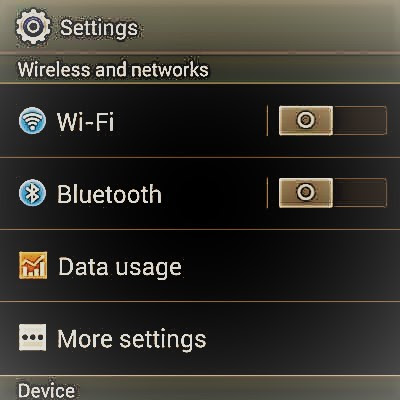
How to Connect Your Android Device to Wi-Fi. These following steps are for Android 7.0 Nougat. 1.If you are setting up or connecting to your home network, you can usually find the default SSID and password or network key printed on the bottom of the wireless router. If you are using a network other than your own, you will need to ask for the network name and password. 2.Scan for a Wi-Fi Network Go to menu bar of basic settings choose the down arrow to open additional settings, and tap on the Wi-Fi network icon Tap on the Settings icon which looks like a gear on your home page, and select Wi-Fi from the Wireless & Networks section. Either of these methods launches the Wi-Fi Settings dialog. This dialog may be called "WLAN" on some devices instead of "Wi-Fi." Turn Wi-Fi on if it is off, using the toggle switch to the right. Once on, the device automatically scans for available Wi-Fi networks within range and displays them as a list. Connect to a Networ...

Beware of Facebook Hackers!

1)Application Permission Whenever on Facebook you answer a quiz , install a Facebook game, or add any application , you will be forced to go through an intermediate screen showing what the permissions the application needs . These permissions can include almost anything, which may also include full access to your Facebook account , even when you’re not connected.Becareful to read the permissions. 2) Spammy Video links: Many a times ,Spammers are targeting Facebook book videos to Spread links of Spammy videos, the moment you click on them , it redirects you and takes control of your fb account to Spam on other fb comments, you might not be even aware of whats going on your facebook. 3)Download Notification: Sometimes when you start a video , you receive a notification that you need to install or update a codec , which is necessary and essential to watch the clip. Even though its true sometimes codec can be a Trojan horse virus which gives a chance for hackers to hack your FB. 4) Mes...

Technical Support Basic knowledge

1) What is active directory? Active directory authorizes and authenticates all users and computers in a window domain network, ensuring the security of the computer and software. Through active directory various functions can be managed like creating admin users, connecting to printers or external hard drives. 2) What is DHCP and what it is used for? DHCP stands for dynamic host configuration protocol. It is used to allocate IP addresses to a large number of the computer system in a network. It helps in managing the large number of IP’s very easily. 3) What is scope and super scope? Scope consists of an IP address like gateway IP, subnet mask, DNS server IP. It can be used to communicate with the other PCs in the network. The superscope becomes when you combine two or more scopes together. 4) What is DNS? DNS mean Domain Naming Service and it is used for resolving IP addresses to name and names to IP address. DNS is like a translator for computers, computers understand the number and...